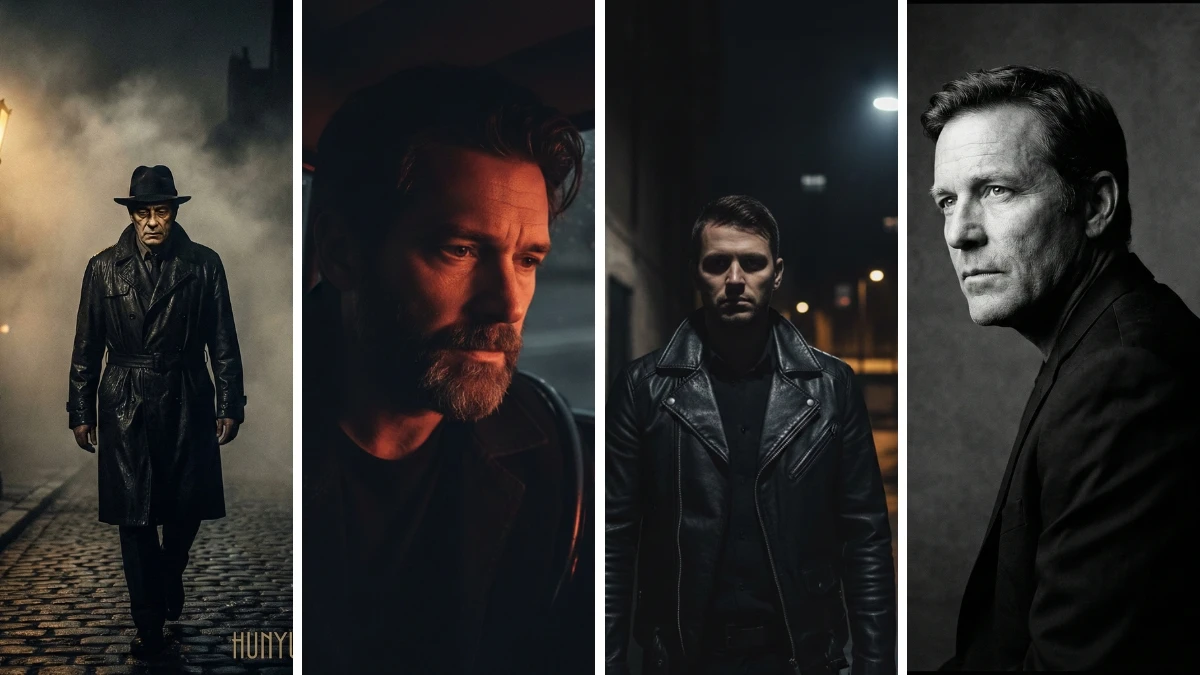
Khám phá 10 prompt chỉnh ảnh phong cách “night aesthetic” bằng Hunyuan AI để biến ảnh thường thành ảnh mang chất điện ảnh tông tối: neon rực rỡ, bóng đổ dày, đường phố ướt mưa và không khí noir u ám.
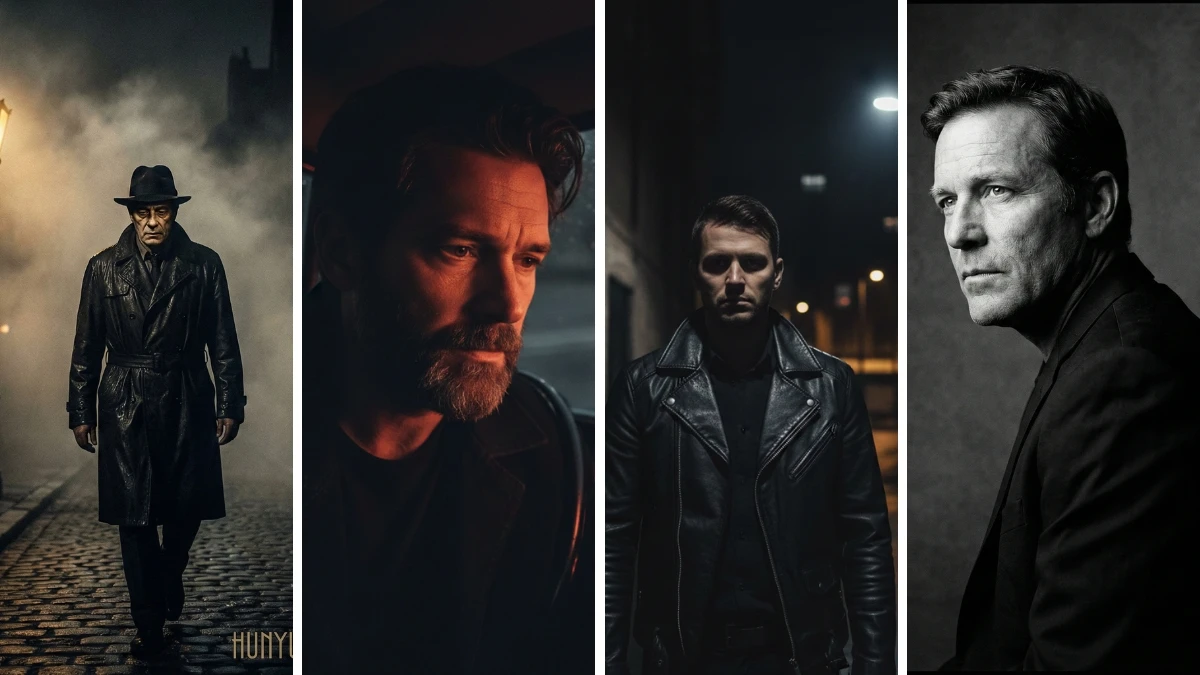
Từ ảnh thường thành khung hình noir: 10 prompt “night aesthetic” của Hunyuan AI để tạo ảnh điện ảnh tông tối
Hunyuan AI Image 3.0 rất phù hợp để tạo ảnh “night aesthetic” giàu cảm xúc, cho cảm giác như một khung hình bước ra từ phim với ánh sáng tối, tương phản mạnh.
Chỉ cần sao chép và dán prompt, bạn có thể nhanh chóng thêm hiệu ứng neon, bóng tối sâu, mặt đường ướt mưa và những dải sáng hắt ngang đầy kịch tính—khiến chân dung hay bối cảnh trông như poster phim.
10 prompt dưới đây khai thác tốt các điểm mạnh của Hunyuan như giữ chi tiết khuôn mặt tự nhiên, ánh sáng có chiều sâu và phông nền giàu không khí. Nhờ vậy, ngay cả người mới cũng có thể tạo ra các phiên bản chỉnh sửa theo phong cách điện ảnh tông tối chỉ trong vài bước.
Cách tạo ảnh
- Mở website Hunyuan Image 3.0 hoặc bất kỳ nền tảng nào hỗ trợ Hunyuan Image 3.0.
- Chọn chế độ:
- Tải ảnh lên nếu bạn muốn chỉnh một ảnh thật sang phong cách night aesthetic.
- Không tải ảnh nếu bạn muốn AI tạo hoàn toàn một cảnh điện ảnh tông tối từ đầu.
- Dán prompt “night aesthetic” của bạn. Trong prompt, hãy mô tả rõ các chi tiết như “dark cinematic lighting”, bối cảnh thành phố ban đêm/hẻm nhỏ, tông màu (neon xanh dương, tím, cam) và cảm xúc (bí ẩn, u buồn, kịch tính).
- Nếu chỉnh chân dung, thêm cụm như “keep face and identity unchanged, ultra-realistic skin texture” để giữ nguyên gương mặt và nhận diện ban đầu.
- Nhấn Generate và đợi vài giây để Hunyuan tạo ảnh.
- Xem kết quả. Nếu cần, hãy bổ sung các câu ngắn như “stronger shadows”, “more neon reflections”, hoặc “add light rain” rồi tạo lại.
- Khi hài lòng, tải xuống ảnh cuối cùng và dùng cho bài đăng mạng xã hội, poster hoặc thumbnail.
Tham khảo thêm các gợi ý ChatGPT sáng tạo nội dung hay nhất của tôi
Prompt chỉnh ảnh “Night Aesthetic” với Hunyuan AI: Tạo hình điện ảnh tông tối
Prompt 1:
"Transform the image into a black-and-white portrait with a three-quarter angle composition. The subject's body should be slightly tilted in a 'a' pose, while the face remains turned to the left, with a sharp and calm side glance that reflects contemplation or determination. Use soft studio lighting from only one side, creating a cinematic side lighting effect to produce a high-contrast chiaroscuro. Illuminate half of the face while casting the other half in shadow, enhancing the dramatic and introspective mood of the portrait."Prompt 2:
"Transform the image into a dark, cinematic portrait with deep shadows and a minimalistic setting. The subject should be dressed in a black leather jacket and standing in front of a dimly lit alley. Use stark, contrasting lighting that casts long shadows on the walls, with the subject's face partially illuminated by a single streetlight, creating a moody, noir-inspired vibe."Prompt 3:
"Create an atmospheric, cinematic portrait of a man in a dark hoodie, standing under a flickering neon sign at night. The background should be blurred with a soft bokeh effect, while the lighting from the neon sign adds a dramatic glow to the subject's face. Use Hunyuan AI to enhance the dark, rainy atmosphere and create a mysterious, intense look with high contrast shadows and a surreal, filmic mood."Prompt 4:
"Generate a night-time cinematic image with a figure in a long trench coat walking down an empty, fog-filled street. The lighting should come from a single dim street lamp, casting a glow on the figure’s face and shoulders, while the rest of the scene fades into shadow. Use Hunyuan AI to amplify the mood of isolation and intrigue, adding sharp contrasts between light and dark to create a cinematic noir atmosphere."Prompt 5:
"Create a cinematic, dark aesthetic portrait of a man sitting in a vintage car, illuminated by the soft glow of dashboard lights. The background should be a rainy, deserted street, with reflections of streetlights on the wet pavement. Hunyuan AI should enhance the contrast between the illuminated areas of the face and the shadowy depths, creating a brooding, cinematic feel with a sharp focus on the subject’s pensive expression."Prompt 6:
"Transform the image into a night scene with a lone figure standing in front of an abandoned building, surrounded by thick fog. Use single-source lighting from a far-off light, casting long shadows and illuminating parts of the subject’s silhouette. Enhance the mood of solitude and mystery with Hunyuan AI, giving the scene a high-contrast, cinematic look with a dark, filmic atmosphere."Prompt 7:
"Design a cinematic portrait of a young man standing in the rain, with the dim light from a nearby building reflecting off the wet sidewalk. Use Hunyuan AI to create a high-contrast image where only the subject’s face and shoulders are softly lit, with the background blending into deep shadows. The rain should add a reflective, atmospheric touch to the scene, emphasizing the dramatic and moody nature of the night."Prompt 8:
"Create a dark cinematic image of a man walking through an urban alley at night, bathed in the glow of a single street lamp. The rest of the scene should fade into shadows, with the subject’s face partially illuminated in a contemplative expression. Use Hunyuan AI to sharpen the contrast, emphasizing the interplay of light and dark to create a dramatic, noir-style mood that highlights both the loneliness and intensity of the scene."Prompt 9:
"Generate a cinematic image of a figure standing in front of an open window, looking out over a dark cityscape at night. The only light should come from the faint glow of streetlights outside, creating soft, directional lighting on the subject’s face. Enhance the shadows using Hunyuan AI to create a contemplative, high-contrast image that evokes feelings of isolation and introspection in the quiet of the night."Prompt 10:
"Create a cinematic night portrait of a man sitting in a dimly lit room, with soft light coming from a nearby window. The light should create a sharp contrast, highlighting only half of the subject's face, while the rest of the image falls into shadow. Use Hunyuan AI to create a dark and brooding mood with subtle details, focusing on the intense expression and deep shadows for an introspective cinematic effect."Tags: Hunyuan AI, night aesthetic, cinematic photo editing
Tags: Hunyuan AI, night aesthetic, cinematic photo editing